You Need for Your Client To Share Their Business Manager Account With Your Business Page!
This Tutorial and Tool Makes it Easy to
Show Them How to Do that
If You're Not Already a Member, Please Check Out Our FREE Facebook Group
for More Marketing Tools and Resources!
Easily Provide Your Client With Your Facebook Business ID and Step-by-Step Instructions to Add You as a Partner!
Finding Your Facebook Business ID
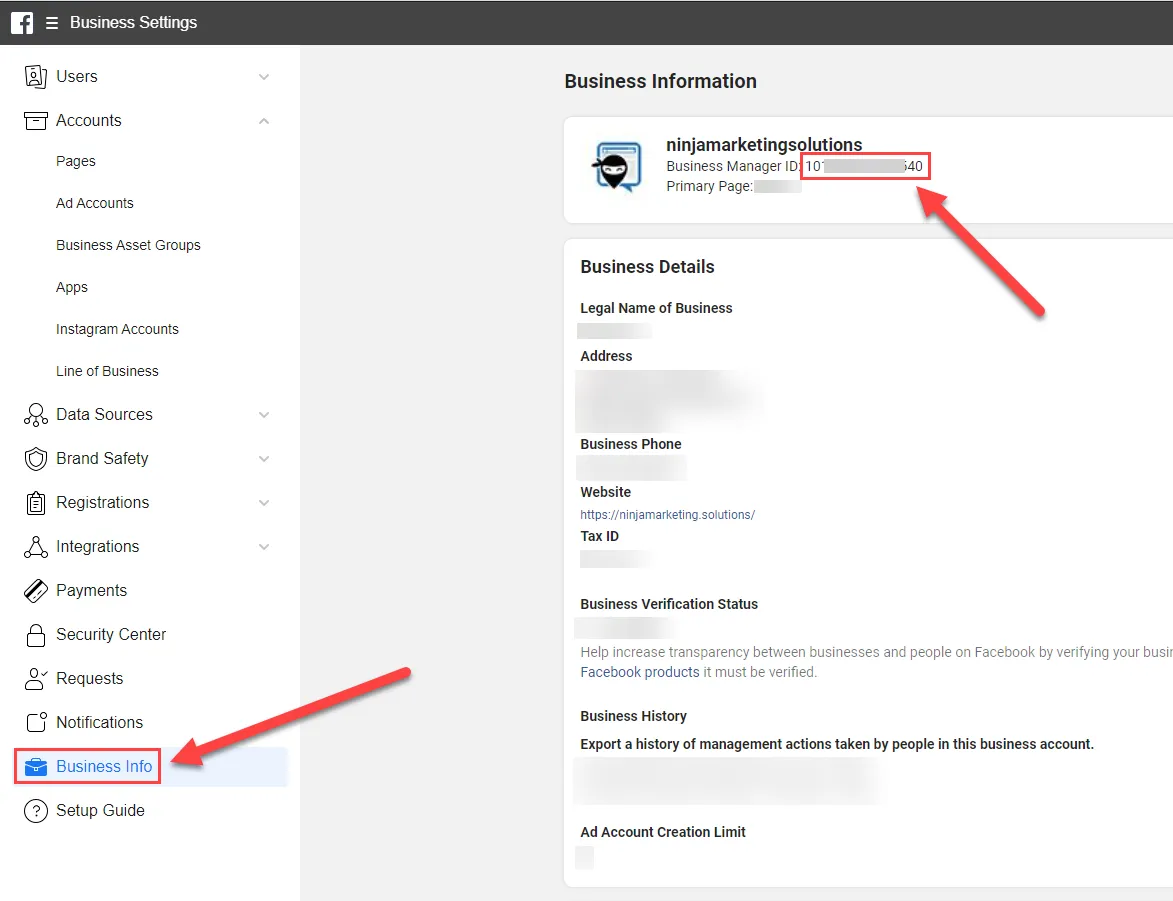
When you're logged in to your Facebook Business Manager account, go to the "Business Info" tab in the left hand column.
Then find your Business Manager ID at the very top underneath the Business Name.
Copy that ID number, as it will be important to share with your client.



2023 - Ninja Marketing Solutions
All Rights Reserved
Legal Stuff & Disclosures
Our site contains some affiliate links for products or services that our team endorses and believes in. If you take action after clicking those links (ie: buy a product we're recommending), then we will earn a commission off of those sales.
Here's the relationship that we'd like to keep with you regarding our affiliate links: we promise to only promote products to you that we truly believe in, and you pick and choose which you want through our links. We'll get a little commission off of the sale, and you'll get awesome product or service recommendations.
This site is not a part of the Facebook website or Facebook Inc. Additionally, This site is NOT endorsed by Facebook in any way. FACEBOOK is a trademark of FACEBOOK, Inc.
For additional information, please see our Privacy Policy.